· David Cruz · Special Education · 11 min read
Why Paper Data Collection Fails SPED Teams (And What to Use Instead)
Paper data sheets can't keep up with the pace of special education. Here's why digital tools change what's possible for IEP tracking.
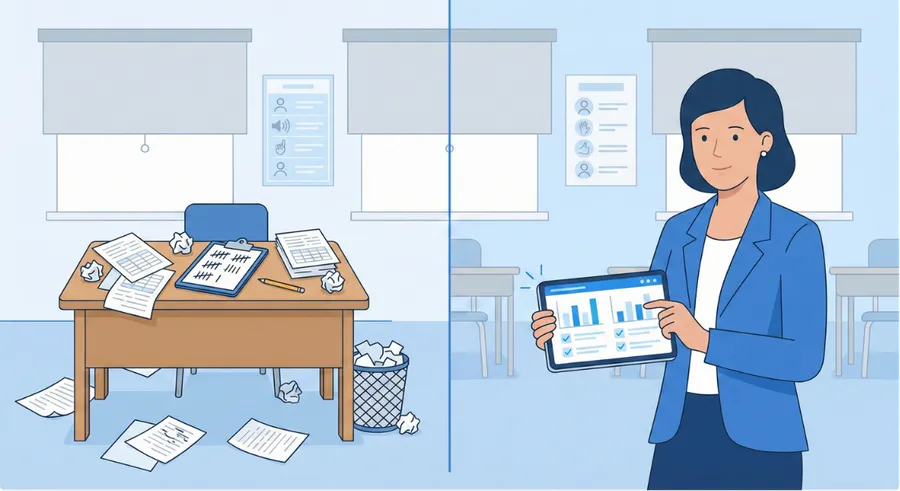
You already know the phrases. “Hey, I’m out of data sheets.” “I forgot to enter it into the Excel graph and I’m like a week and a half behind.” “Who didn’t fill out hours 9 through 10?”
If you work in special education, none of this surprises you. Paper data collection was designed for a simpler time - one student, one behavior, one staff member. That’s not the reality anymore.
Why Paper Breaks Down
The problem isn’t your team’s effort. It’s the system. Paper asks too much when you’re tracking multiple students across multiple behaviors with multiple staff members throughout the day.
Here’s where it falls apart:
- Missing data - Pages get lost, left in the wrong room, or never filled out
- Delayed entry - Staff fall behind transferring tallies to Excel, sometimes by weeks
- Inconsistent tracking - Different staff record differently, making data unreliable
- Time-consuming reports - Hours manually building graphs for IEP progress reports
- No real-time visibility - You can’t see trends until someone updates the spreadsheet
The result? Data quality suffers. Decisions get made on incomplete information. And teachers burn time on admin instead of instruction.
What Digital Tools Change
The shift from paper to digital isn’t just about convenience. It changes what’s actually possible for your team.
TallyFlex was built for exactly this situation - multiple recording methods running on phones, tablets, or Chromebooks, with data syncing automatically across your team.
Here’s what changes when you go digital:
Data collection happens during instruction, not after. Staff tap a screen instead of hunting for the right paper sheet. Interval recording, frequency counts, duration tracking - all running simultaneously without juggling stopwatches and tally sheets.
Graphs generate themselves. No more Excel backlogs. Every completed session updates your trend charts automatically. You can see when a student is regressing before the next IEP meeting, not after.
Progress reports take minutes, not hours. Select a date range, pull the average, print the graph. One Virginia SPED teacher told us she went from spending hours on reports to finishing them in minutes: “I’m selecting a data field from this day to this day, give me the average, pop it’s there. Print the graph and it’s going straight into the progress report system.”
Staff actually track consistently. When data collection is easy, it happens. When it’s a hassle, corners get cut. One school using TallyFlex found staff tracking daily instead of twice a week - a meaningful difference for students with intensive behavioral needs.
What to Look For in a Digital Tool
Not all digital tools solve these problems. When evaluating options for your SPED team, look for:
- Works on Chromebooks - If your school uses Chromebooks, your data tool needs to work on them, including offline
- Offline capability - Internet goes down. The tool should keep working and sync later
- Multiple recording methods - You need frequency, duration, interval, and ABC data in the same app
- Team access - Multiple staff tracking the same student without stepping on each other’s data
- Instant graphs - If you still have to build charts manually, you haven’t solved the problem
- Privacy and compliance review - Student behavioral data requires proper security
TallyFlex checks all of these. It has HIPAA safeguards across all plans, BAA support on Solo and Teams, district DPA support for schools using Teams education pricing, offline access on Chromebooks and mobile devices, and unlimited staff accounts on the Teams plan.
A Rollout Playbook That Actually Works
Most failed digital rollouts in special education die because the school treats it like an IT project instead of a teacher project. Here’s the version that actually sticks, week by week, in the hands of one classroom or a small SPED team.
Week 1 - One classroom, one teacher. The champion teacher (you, probably, if you’re reading this) sets up a TallyFlex account on the Free plan, uses the Demo Client or sample students, and runs through the recording methods. Don’t roll anything out yet. The goal of week 1 is for one person to know the tool well enough to teach it.
Week 2 - District-approved real data on a small caseload. Once your district has authorized the tool, pick three to five students whose data is currently most painful to collect on paper. Set up their trackers in TallyFlex. Run paper and digital in parallel for the first week. Yes, it’s double work for five days. It’s the only way to prove to yourself the data is comparable.
Week 3 - Drop the paper. If week 2 went well, retire the paper sheets for those students. Keep paper for students you have not moved yet. The team should now feel two things: relief that the tallying is faster, and a small panic when they realize the trends are visible in real time. That panic is healthy. It means the data is finally close enough to make decisions on.
Week 4 - Bring in the paras. Add paraprofessionals or co-teachers to the account. Walk them through the same students, the same trackers. The first session a para runs solo on TallyFlex is the moment the rollout has actually happened. If they can collect data without the SPED teacher in the room, the system works.
Week 5 - Expand the caseload. Move the remaining students into the approved Teams workspace. Retire paper for the classroom entirely. Establish the weekly data review cadence (Friday afternoon, Monday morning, whichever fits your team).
Week 6 - Reporting cycle. First IEP progress report cycle on the new system. The teacher who used to spend a Saturday building graphs in Excel finishes the same set of reports in a couple of hours, because the graphs already exist. The relief is the proof point you’ll quote when the SPED director asks how it’s going.
Week 7 and beyond - Expand to a second classroom. The champion teacher walks the next teacher through the same five-week pattern. By the time three classrooms are running, the school has enough internal expertise to handle onboarding without leaning on the original champion.
This is the slow version. There’s a fast version where the SPED director rolls out the whole school in two weeks, but the fast version has a higher failure rate because the staff feel pushed instead of pulled. The slow version takes six weeks and works.
The Concerns You’ll Hear (And Honest Answers)
“District IT won’t approve a new app.” This is the most common pushback. The honest answer is that IT departments approve apps they’ve vetted. TallyFlex runs on Chromebooks (which most districts already manage), works offline so it doesn’t add load to school wifi, and supports district review with encryption, access controls, audit logs, and a DPA on request for Teams education-pricing customers. The IT request usually goes through if the SPED director writes the justification: “Our staff are spending administrative hours on data transcription that should go to instruction. This is a tool that solves it.” If your district uses a mobile device management (MDM) platform, TallyFlex installs through the standard channels.
“What about parent privacy?” Parents often hear “the school is using an app to track my child” and assume the worst. The answer that usually settles it: behavioral data has always been collected on paper, in spreadsheets, and in databases. The only thing that’s changing is the tool. The data still belongs to the school. It’s still protected under FERPA. TallyFlex does not sell student data or use it for advertising. For district-authorized Teams education use, student data is used to provide and support the service under the school’s agreement and applicable privacy terms. The school’s existing student data privacy policy still governs.
“Is this FERPA compliant?” TallyFlex supports district FERPA review with a Data Protection Agreement (DPA) on request for school districts using Teams with education pricing. Schools using TallyFlex on the Teams plan with education pricing get unlimited staff accounts, role-based permissions, and 7-year audit log retention.
“What if a teacher leaves?” On TallyFlex Teams (the plan school districts use, with education pricing), the school owns the account, not the individual. When a teacher leaves, the SPED director removes their access. The student data stays. The new teacher gets access to the historical data so they can continue programs without starting over. This is why a school-level rollout matters - individual teacher accounts on the Free plan don’t provide this continuity.
“What about students who already have years of paper data?” You don’t need to retroactively enter every old data point. Pick the start of the new IEP cycle as the start of the digital record. The paper history stays in the file. The digital record begins with the next data collection day. By the time the next IEP is due, you have a clean digital data set for that period.
“How do we know it’ll work for our specific students?” Run the parallel-collection week (Week 2 above). If digital data captures the same patterns as paper, it works. If it doesn’t, you’ve found out cheaply. Most teams find that digital captures more data, not less, because the friction of collection is lower.
A Real District Workflow Example
Here’s what the path from “we should try this” to “we rolled it out” looks like in practice.
Champion teacher identifies the need. A SPED teacher with five students on her caseload is spending three hours every Saturday building Excel graphs for IEP progress reports. She tries TallyFlex on her own with sample students, sees the trend dashboard generate without her doing anything, and knows she has to bring it to the team.
Conversation with the SPED director. She brings two artifacts to the meeting: a paper data sheet from a current student, and a screenshot of the same data in TallyFlex with a 14-day trend graph. She says, “Same data, but I didn’t have to make the graph.” The director says, “Show me the cost.” She pulls up the published pricing page. The director nods.
Loop in IT. The director sends a request to district IT with the justification, the FERPA documentation, and the request for a DPA. IT reviews. If the district has a privacy review process, this can take two to four weeks. If they do not, it can be faster, but approval timing still depends on the district.
Complete the DPA review. TallyFlex can provide a DPA on request for Teams education-pricing customers. District legal review may vary, and activation should wait until the school’s student-data approval process is complete. Once approved, the Teams plan with education pricing gives the school unlimited staff accounts.
Roll out to the champion classroom. The champion teacher follows the six-week rollout playbook. By the end, her classroom is running entirely on TallyFlex.
Expand to the SPED department. Once one classroom proves out, the director adds the next teacher. The champion teacher trains the second teacher (twenty minutes is usually enough). The next classroom follows the same six-week pattern.
District-level rollout. When the SPED department is running smoothly, the director takes the case to the curriculum office or assistant superintendent for special education. By that point the data isn’t theoretical - it’s actual progress reports completed in less time, with cleaner trends, by happier teachers. The expansion budget conversation is much easier to have with that evidence in hand.
The whole arc, from one champion teacher’s first login to a department-level rollout, is usually a school year. That’s slower than vendors promise and faster than most digital tools actually deliver.
Common Questions
Do we need to buy devices for staff?
Most schools don’t. TallyFlex runs on Chromebooks (which most districts already issue), iPads, Android tablets, phones, and the web. If your school has Chromebooks for students, the staff Chromebooks work. If staff have phones they already use during the day, they can use those.
Can we keep using paper for some students and digital for others?
For a transition period, yes. Most schools end up running parallel for a week or two and then retire paper entirely because tracking two systems creates more confusion than it saves.
What happens to the data when a student transitions to a new school?
The school owns the data and the student record. If the student transfers within the district, the receiving school can be granted access. If the student transfers out of district, the data stays with the originating school as part of the special education record. Export the data as a Generate Report PDF for the cumulative file before closing the student’s record.
Is there a way to import historical paper data?
There isn’t a bulk paper-to-digital import tool. Manually entering historical data is rarely worth the time. Most teams pick the start of a new IEP cycle as the digital starting line and let the paper history sit in the file.
What if our school doesn’t have reliable internet?
TallyFlex works offline. Data is stored locally on the device during the session and syncs the next time the device has internet. Schools with spotty wifi find this is one of the strongest reasons to switch - paper at least kept working when wifi went down, and most cloud-only tools didn’t.
Getting Started
Most schools start small - one classroom, one teacher, a handful of students. With affordable school pricing, it’s a low-risk way to see if digital tracking works for your team before rolling out school-wide.
Better data leads to better decisions. Better decisions lead to better IEP progress monitoring. That’s the real reason to make the switch.
See how effortless data collection can be at TallyFlex.