· David Cruz · Schools & Special Education · 4 min read
How to Make Daily Progress Reports Easier to Use in CICO
Build a Daily Progress Report routine staff can keep up with, from clear expectations and quick ratings to useful progress review.
Key takeaways
- Use a short point card aligned with expectations staff already teach.
- Rate at predictable points and pair the score with useful feedback.
- Review patterns by expectation and period, not only the daily total.
- Keep ratings and progress review together in TallyFlex Daily Points.
Daily Points began with a request from a school to make its daily point sheet easier to use across classrooms and easier to review over time.
In many Check-In/Check-Out (CICO) routines, this kind of point sheet is called a Daily Progress Report, or DPR.
Keeping the sheet current across classrooms and ready for review is the hard part. That is why we built Daily Points.
What the Daily Progress Report does in CICO
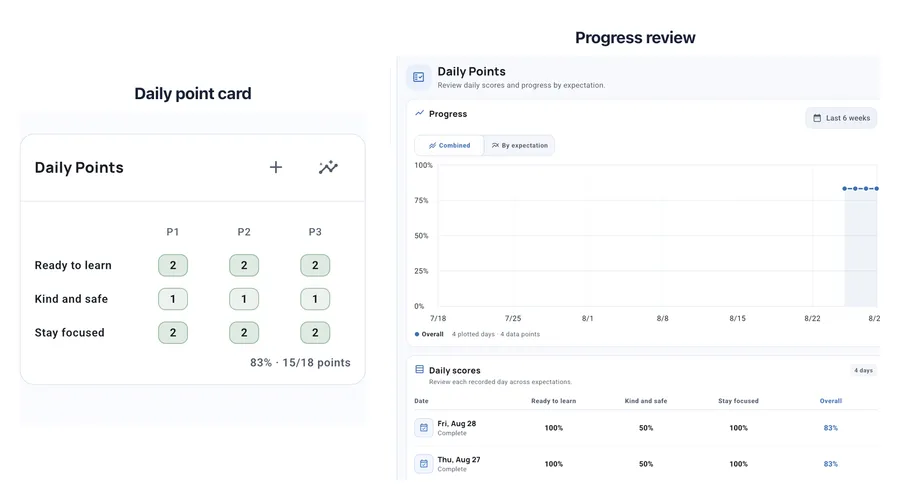
A Daily Progress Report (DPR), often called a daily point card, gives staff a consistent way to rate expectations at selected points in the day.
CICO is the broader routine. The Institute of Education Sciences describes morning check-in, feedback and ratings during the day, afternoon check-out, and follow-through with the completed DPR.
The DPR is the shared record that connects those moments. It should be the easy part.
Build a card staff can use during instruction
Use a few familiar expectations
Start with expectations the school already teaches, such as Ready to learn, Kind and safe, or Stay focused. The Center on PBIS recommends Tier 2 supports that align with schoolwide expectations and require little extra effort from teachers.
Add a short guidance note when an expectation could be interpreted differently across settings.
Rate at predictable moments
A period can be a class, transition, activity block, morning check-in, or afternoon check-out. Choose moments when staff can give the student feedback. More rows do not automatically make the card more useful.
Define the scale once
Give each value one shared meaning. For example:
- 2: Met the expectation
- 1: Met it with reminders
- 0: Did not meet it during the period
Match the descriptions to the shared 0, 1, 2 rubric your school uses and keep them visible while staff rate.
Keep not measured separate from missing
Sometimes an expectation does not apply during a period. Marking it N keeps it out of the score. A blank cell means the rating still needs attention.
That distinction keeps an incomplete card from looking complete.
Where Daily Points helps
Set the expectations, periods, rating descriptions, and optional guidance once. Staff can then rate from the student overview or the Points panel during an active session.
Name periods Morning Check-In, Classwork, and Afternoon Check-Out if that matches your routine. Daily Points keeps the ratings and progress review in TallyFlex. The conversations, feedback, and reinforcement stay with the school team.
Related trackers can show observations from the same period, such as event counts or Task Analysis steps. Staff use that context while applying the school’s rating guide.
The team can then:
- See the completed card for a specific day
- Graph overall progress across a selected date range
- Compare individual expectations
- Open the Daily scores table and return to an earlier date
Review patterns, not just the daily percentage
One overall score is easy to scan, but it can hide the pattern that matters.
A student may be consistently successful during Morning Meeting and need more support during afternoon Classwork. One expectation may be improving while another stays flat. Missing ratings may cluster around the same transition or staff handoff.
Reviewing by expectation and period gives the team better questions: Is one part of the day consistently harder? Is one expectation improving? Are the same ratings often missing? The Center on PBIS recommends frequent review of student data at Tier 2, including data from daily progress report cards.
A quick Daily Progress Report check
Before starting, make sure the team can answer five questions:
- Which expectations matter most?
- What does each score mean?
- When will staff complete each rating?
- When should they use N instead of leaving a blank?
- When will the team review the day and the longer-term pattern?
Once those answers are clear, staff can focus on feedback instead of managing the form.
For broader CICO planning, use the Center on PBIS CICO guide.
Explore Daily Points
- Daily Points for School Teams - See the feature in action
- Daily Points Help Guide - Set up your point card and start recording
- TallyFlex for Schools - Learn about Teams for schools and districts
Questions about Daily Points? Email support@tallyflex.com without including student information.