· David Cruz · ABA Software · 5 min read
Switching from Catalyst to TallyFlex - Evaluation Checklist
Thinking about switching from Catalyst or Ensora Data Collection to TallyFlex? Use this cautious switching checklist to test workflow fit before changing systems.

Key Takeaways
Thinking about switching from Catalyst to TallyFlex? TallyFlex is the ABA data collection app 10,000+ practitioners already chose - with transparent published pricing, Session Timeline, Chromebook and offline support, and responsive product support. Use this as a switching checklist for testing the TallyFlex workflow before you change systems.
Source note: Ensora Data Collection’s App Store listing describes the app as formerly Catalyst. This checklist avoids claims about current Ensora pricing or support response times unless you verify them directly with the vendor or inside your account.
If you’re reading this, you’re probably already running the math on a switch. Maybe your current workflow is not matching the way your team collects data during sessions. Maybe you need clearer pricing before you can make a decision. Maybe your team has stopped asking for new features and started asking when documentation will go back to being something they do inside the session, not at 10pm.
The problem usually is not your practice - it is workflow fit. You built procedures around the system you had. The question now is whether a focused data collection workflow would reduce friction for the people doing the work.
TallyFlex was built for focused ABA data collection. You can review pricing before a sales call, start with a real workflow, and test whether collection, review, and reporting improve for your team before you decide what to change.
What to test in the first TallyFlex session
When an RBT opens TallyFlex for the first time, test the parts of the workflow that determine whether the tool will actually get used.
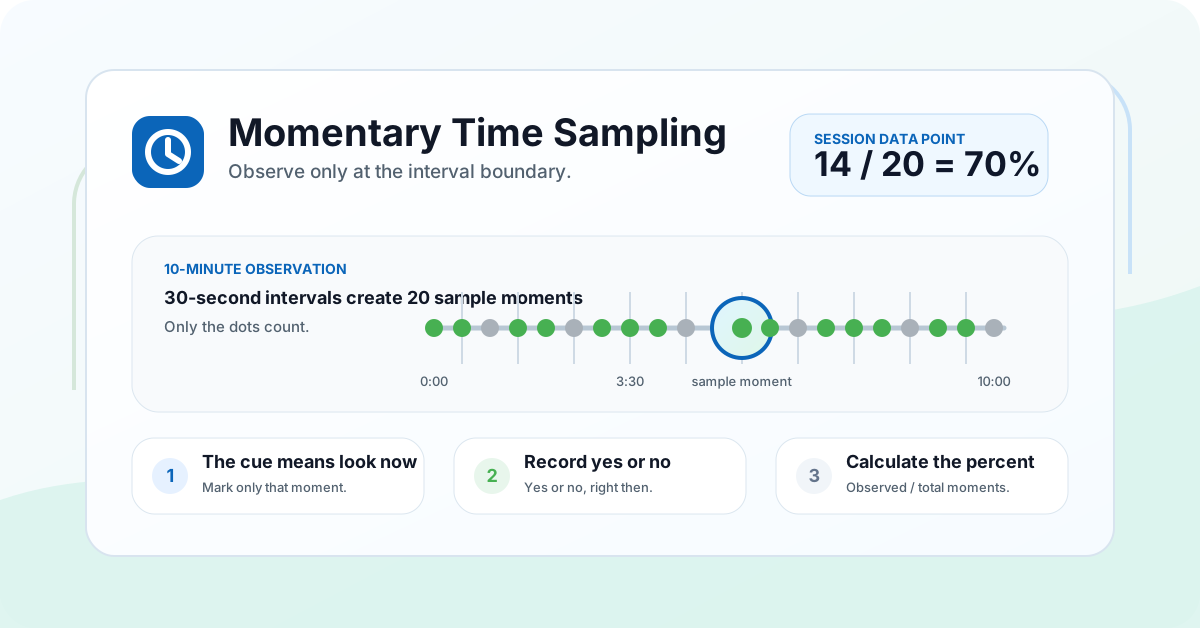
Can staff collect without leaving the session flow? Every tracker is one tap away - frequency, duration, latency, interval, percent correct, task analysis, ABC, momentary time sampling. Nine recording methods, all designed for the person actually running the session.
Does Session Timeline make review easier? Session Timeline shows when behaviors occurred during a session so supervisors can review timing and context instead of reconstructing the session from notes later.
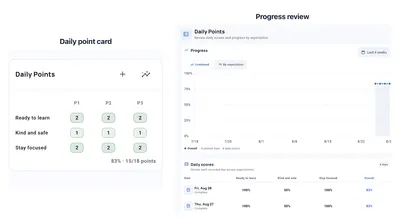
Do trends update soon enough to help supervision? 14-day trend graphs refresh as data comes in. You do not wait until Friday to see what Tuesday looked like, open a spreadsheet, or rebuild a dashboard.
The pricing that actually works for teams
TallyFlex’s pricing is published. No “contact sales” gate.
- Solo: flat monthly rate for one practitioner working alone, up to 15 clients, with no shared staff access
- Teams: per-client pricing in volume tiers (clinics) or per-student-per-school-year billing (school districts). Unlimited staff in either mode. See current pricing for exact figures.
- Annual: discounted yearly billing on Solo and Teams (Solo: a single annual rate; Teams: pay 10 months for 12, a 2-month discount). See current pricing for exact figures.
No setup fee. No per-staff charge. No implementation contract. See the full numbers on the pricing page.
The practical test is simple: if the workflow saves enough review, transcription, or reporting time each week, the purchase is easier to justify.
A safer switching path
Switching can be simpler than teams expect when you start with the workflow instead of trying to move every historical record. TallyFlex does not import third-party historical data; keep exports from your old system for the record, then start new sessions in TallyFlex once the workflow holds up. Here’s a cautious version.
- Export what you can from Ensora Data Collection. Pull whatever session data, graphs, and reports your current plan lets you export. Your clinical history is yours - verify the export options in your account.
- Create your account on TallyFlex. Five minutes. The 14-day Teams trial takes a credit card - cancel anytime in the app before day 14 and you are not charged. Your email becomes the admin account.
- Set up your first client. Use the Program Wizard to build a program, add phases and targets, or start with a standalone tracker. If you have BCBA standards your team uses repeatedly, the Template Library has 100+ curated templates across 10 ABA domains and you can clone with PHI stripped.
- Invite your team. Unlimited staff accounts on Teams. New hires auto-provision when they accept the invitation.
- Run your first session. This is where you stop reading and start using.
Many teams can get a working evaluation setup in an afternoon because the first test is the data collection workflow itself, not a full platform change.
When Ensora Data Collection might still be the better fit
A cautious guide says this out loud. If you are locked into a bundled billing and scheduling contract with Ensora Data Collection and switching mid-contract would create more friction than value, it may be worth riding out the term. TallyFlex is focused on data collection - it does not replace a full practice-management suite. If billing integration is the reason you chose Catalyst in the first place and it still works for that, the decision is closer.
For the rest of the decision, verify fit directly: session reliability, pricing clarity, team adoption, Chromebook support, offline sync, and whether TallyFlex covers the clinical workflow you need without replacing systems you still rely on.
Your laptop shouldn’t come out after 9pm
That’s the real test of an ABA data app. Can the people doing the work close their laptops at the end of the day with every session documented, every trend visible, and every report ready? If the answer is no, you’re paying for software that’s making the job harder.
TallyFlex was built for the people doing the work. Built for the RBT collecting data mid-session, the BCBA analyzing trends between supervisions, and the SPED teacher generating reports between IEP meetings. Trusted by 10,000+ practitioners. HIPAA safeguards across all plans, and district DPA support is available for schools using Teams education pricing. Support that actually responds.
Documentation shouldn’t follow you home.
See the difference for yourself. Start Tracking.