Track Weekly Performance Metrics
Monitor appointments, therapy hours, and attendance. Updates automatically throughout the week.
Weekly Performance Metrics
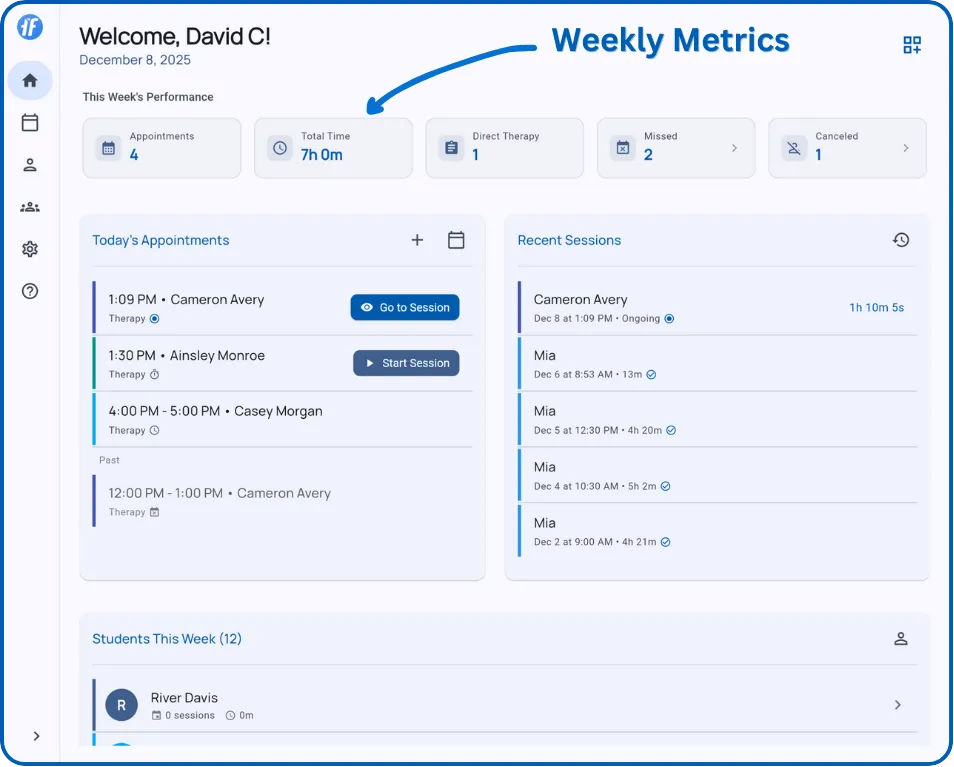
Five key metrics that update automatically as you complete appointments and sessions.
Appointments
Total appointments scheduled this week (Monday-Sunday), including completed, scheduled, missed, and canceled.
Use for: Weekly caseload volume.
Total Time
Hours scheduled across all appointments, regardless of whether they were completed or missed.
Use for: Workload planning and billing estimates.
Direct Therapy
Number of therapy-type appointments (the default when scheduling).
Use for: Tracking therapy sessions vs other appointment types.
Missed
Appointments marked as missed when scheduled time passes without starting the session.
Use for: Monitoring attendance patterns.
Consistently high numbers for one client may indicate scheduling adjustments needed.
Canceled
Appointments canceled during the week by you or the client.
Use for: Understanding schedule reliability.
What’s Next?
Explore related dashboard features:
- Home Dashboard - Overview of all dashboard sections
- Today’s Appointments - Managing your daily schedule
- Recent Sessions - Review recent sessions
Need Help?
Questions about performance metrics? Email support@tallyflex.com for assistance.