Client Overview
View at-a-glance progress with top weekly changes and upcoming appointments.
Quick Pre-Session Review
The Overview tab shows your top 5 trackers with the biggest week-over-week changes and upcoming appointments.
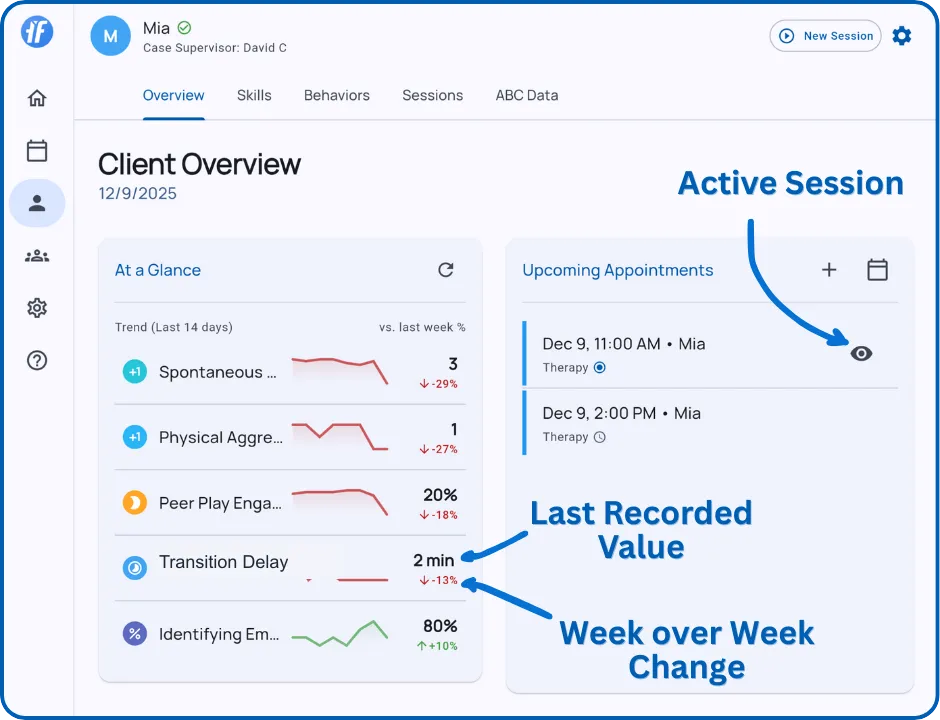
At a Glance
Top 5 Weekly Changes - Shows behaviors and skills with the largest percentage change compared to last week.
Each tracker displays:
- Sparkline - Visual trend over recent sessions
- Current Value - Latest percentage, frequency, or duration
- Change Indicator - Percentage increase or decrease vs. last week
Tap any tracker to open the detailed graph view.
How it helps: Quickly identify which targets improved, declined, or need attention before your session.
Upcoming Appointments
This week’s schedule with:
- Date, time, duration
- Session type (Therapy, Assessment, or Supervision)
- Countdown timers for today (“In 2 hours”, “Now”)
Actions: Start Session, Reschedule, View Details, Cancel
Daily Points Today Card
For Teams with Daily Points enabled and configured, the Overview tab includes today’s expectation-by-period point card. Staff can review completion and open a period to record or update its ratings.
See Daily Points for setup, entry, tracker evidence, and Analysis.
What’s Next?
Explore detailed progress data:
- Skills & Behaviors - View all progress graphs
- Records - Review completed sessions, appointment notes, and Service Records
- Working with Graphs - Learn how to customize graphs
Need Help?
Questions about the client overview? Email support@tallyflex.com for assistance.