Saving Templates
Save any target or program as a reusable template with automatic PHI removal.
Save a Template
Turn any target or program into a reusable template. Open a target or program, tap the three-dot menu, and select Save as Template.
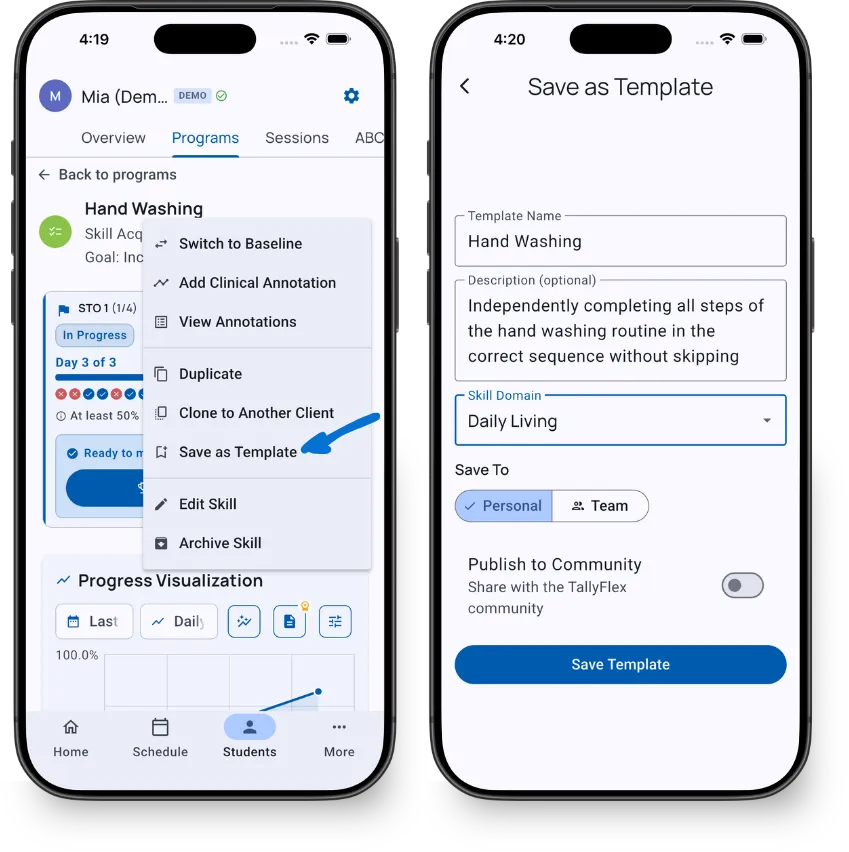
The form pre-fills the name and description from your source target. Edit as needed, choose a skill domain, and select where to save:
| Destination | Who Can See It | Plan Required |
|---|---|---|
| Personal | You only | Solo |
| Team | All team members | Teams |
Tap Save Template to finish.
What Gets Saved
TallyFlex keeps everything needed to recreate the target:
- Name, description, and abbreviation
- Recording method
- Mastery criteria
- Prompt levels and task analysis config
- STO definitions (without progress data)
TallyFlex automatically strips all client-specific data - IDs, timestamps, session history, notes, color, and status fields. What you get is a clean clinical definition ready to reuse.
Review your template name and description before saving. Auto-stripping handles structured data, but check that free-text fields don’t contain client names or identifying details.
Publishing to Community
Toggle Publish to Community to share your template with all TallyFlex practitioners. You’ll confirm that the template does not contain PHI and is appropriate for community sharing.
Community templates go through auto-moderation that scans for PHI patterns (names, dates, phone numbers) before they become visible. See Community Templates for details.
What’s Next?
- Community Templates - Publishing, moderation, and ratings
- Importing a Template - Use a saved template with a new client
- Browsing Templates - Find templates across all four tiers
Need Help?
Questions about saving templates? Email support@tallyflex.com for assistance.