Cross-Client Copy
Copy targets and programs to other clients in seconds. No manual re-entry needed.
Copy Targets and Programs
When multiple clients need the same setup, create it once and copy it. Open a target or program, tap the three-dot menu, and select Clone to Another Client.
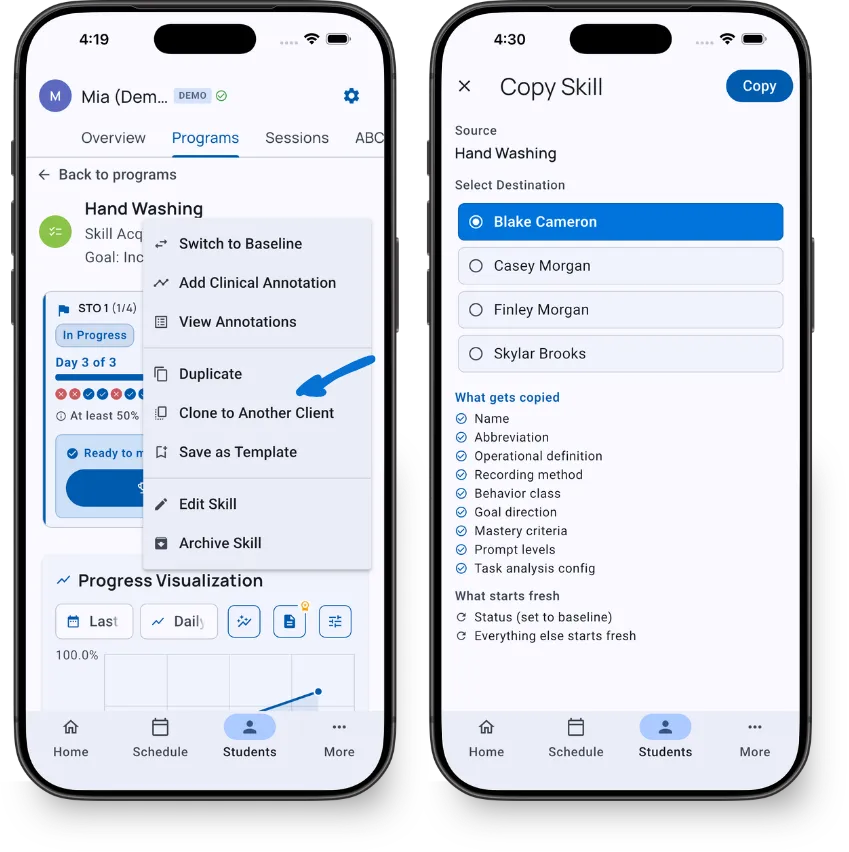
Select the destination client, review the summary, and tap Copy. Clinical definitions carry over - progress data resets so the new client starts fresh.
Duplicate Within Same Client
Need a second target with a similar setup? Select Duplicate from the three-dot menu instead. The copy appears with “(Copy)” appended to the name.
Program Copying
When you copy a program, TallyFlex copies the entire structure - program settings, all phases (if any), and all targets with their clinical definitions. Each target gets a unique color in the destination client.
After copying, review and adjust the program for the new learner’s needs. Mastery criteria and targets may need modification based on their current assessment.
Copy from Demo Client
Free users can copy targets and programs from Mia (Demo) to real clients - a quick way to get started with proven configurations.
Copying to non-demo clients requires a Solo or Teams subscription.
What’s Next?
- Programs Overview - Learn how programs organize targets into phases
- Template Library - Browse 100+ ready-to-use templates
- Skills & Behaviors - Manage individual targets
Need Help?
Questions about copying? Email support@tallyflex.com for assistance.